



DiodeCommunity report
Makerflo Laserette
white
Shared by @Wesley Kriger on Atomm
Important safety notice
Settings are starting points — always run a test cut on scrap before your final piece. Follow your manufacturer's guidance, wear eye protection, and ensure proper ventilation.
Laser Settings
Engrave · Vector · Flat SurfacePower
50
Speed
700
LPC
300
Passes
1
defocus
3 mm
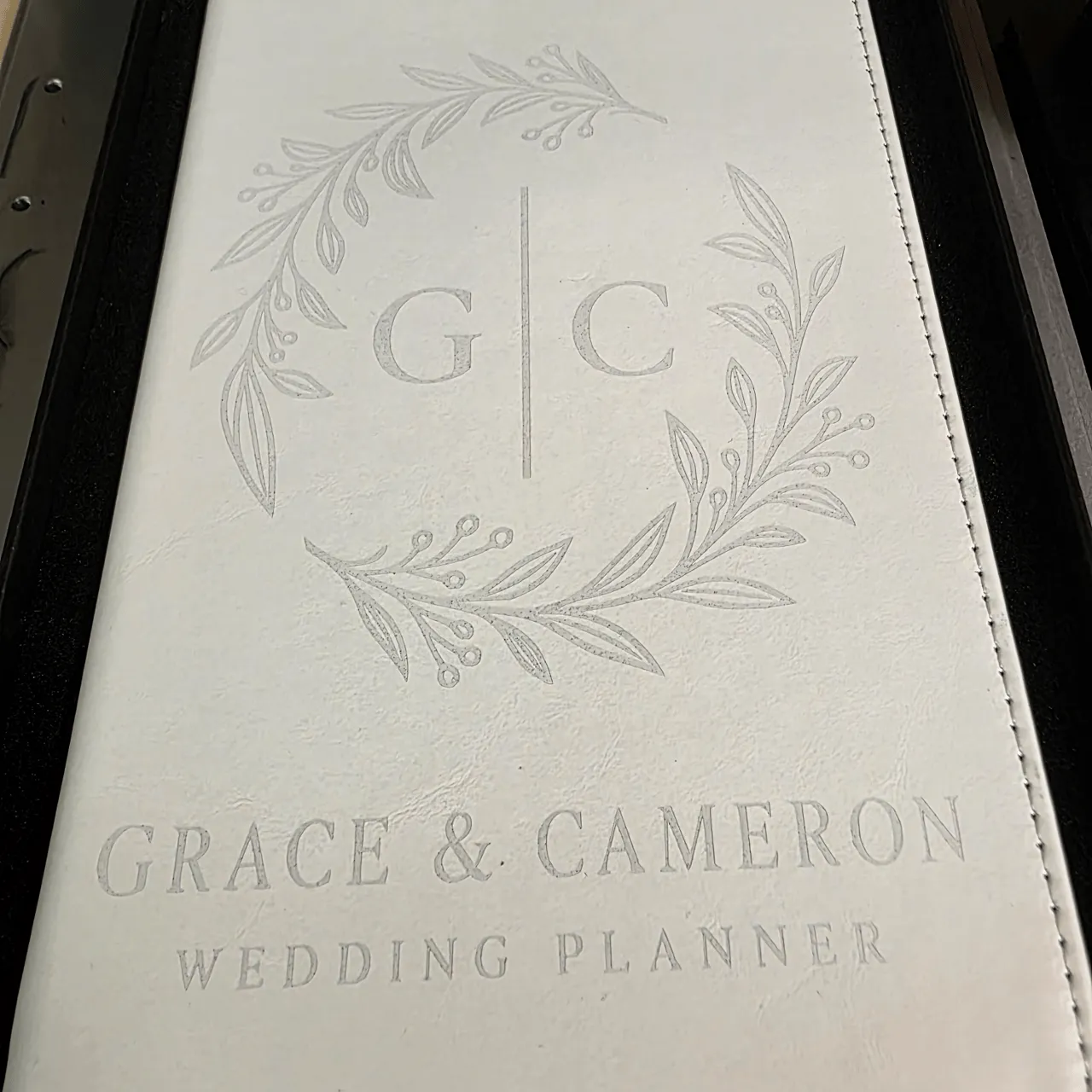
Grace & Cameron Wedding Planner
MakerFlo Laserette - xTool F1 Ultra - Working Instruction Sheet v1
Project Result So Far
Front cover engraving completed successfully on white MakerFlo Laserette. The cleaned result was accepted as good, so no
second pass was run on the front. This sheet records the workflow and settings used up to this point; the small business logo
planned for the back is not yet finalized.
Item Final / Proven Value
Engravable area 5.0" wide x 8.5" tall
Final artwork size 4.611" wide x 6.460" high
Artwork G | C botanical emblem; GRACE & CAMERON; WEDDING PLANNER
Machine xTool F1 Ultra
Material MakerFlo white Laserette
1. Prepare the Artwork
1. Import the clean black-and-white PNG artwork into xTool Studio.
2. Select the bitmap and choose Trace.
3. Use Auto-trace. Keep Layering by color OFF.
4. Trace settings that worked: Fuzziness 100 / Denoising 26 / Smoothness 0.60.
5. Save the trace. The resulting artwork should show as a Compound vector.
6. Keep the original PNG off
Community Feedback
No votes yet — be the first to report how these settings worked.
Export
xTool machine: open it straight in xTool Studio, or download a .mxs (Studio → Materials → Import).
Sponsored
All American Print Supply
DTF and UV printers, supplies and xTool machines.
Code FOUNDRY: 5% off, machines included
Shop AAPS →Machine Context
BrandxTool
ModelF1 Ultra
Laser typeDiode
Wattage20W
Compare against your own machine before treating these as a starting point.
Material Details
MaterialMakerflo Laserette
Color / Finishwhite
BrandMaker Flo
Shop machine — xTool →
Code ERIK100 — $100 off $1,699+ (or ERIK80 — $80 off $999+)
Provenance
Source type
Community report
Shared by a maker in the community. Helpful for context, but not verified for every setup.